If you have been applying for jobs at multinational companies (MNCs) or larger corporate firms in Mangalore and across India, you have likely experienced a frustrating pattern: you spend hours customizing your resume, hit "Submit" on a job portal, and receive an automated rejection email just a few hours later.
You find yourself wondering, Did a human manager even look at my application?
The short answer is no. In the modern recruitment landscape, a human recruiter rarely sees your resume initially. Instead, large corporations use an automated software screening tool called an Applicant Tracking System (ATS).
To land interviews at top companies, you must understand how this software parses your information and learn exactly how to format your resume to get past the initial digital gatekeeper.
What is an ATS and Why Do Companies Use It?
An Applicant Tracking System is an enterprise software application designed to automate, organize, and streamline an organization's hiring pipeline.
When a major company posts a single open position online, they frequently receive hundreds or thousands of applications within a matter of days. A human HR team simply does not have the time to read through thousands of pages of text.
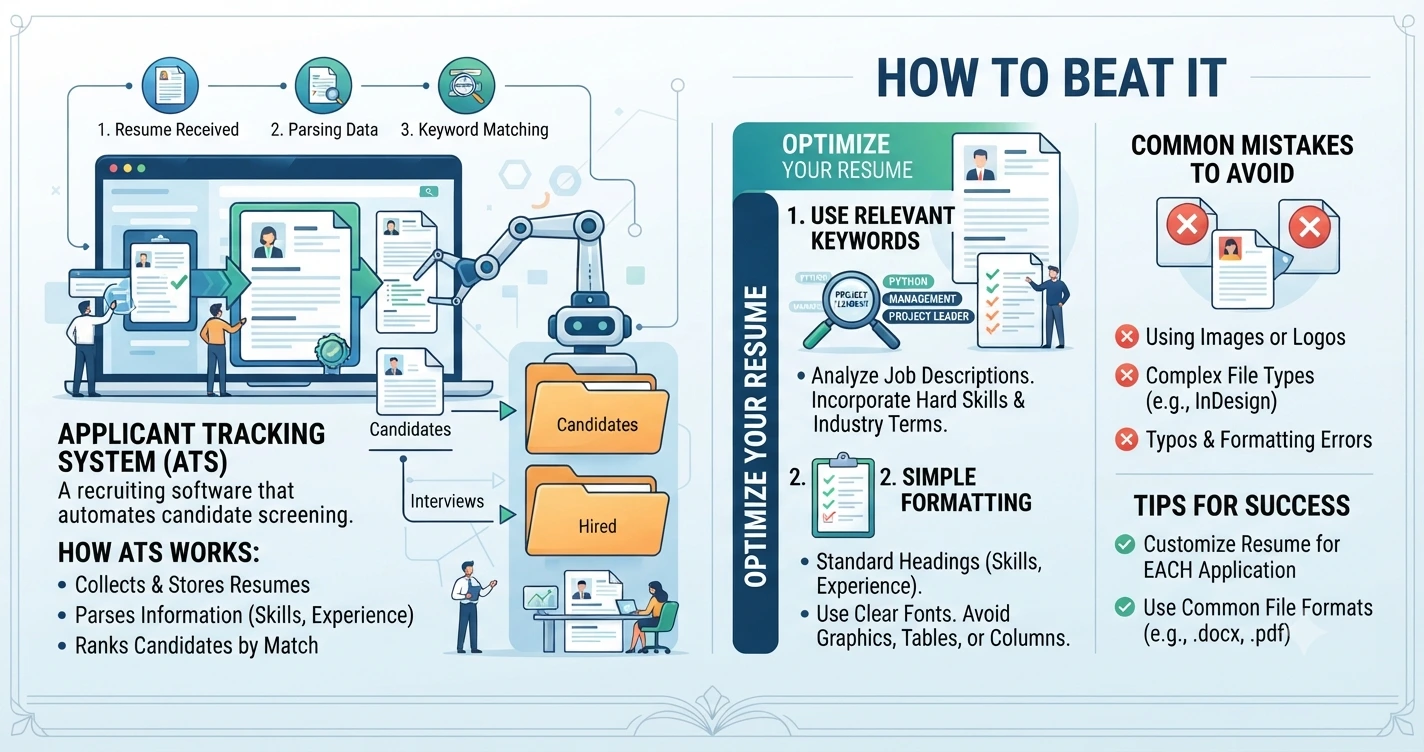
The ATS acts as an automated filter. When you upload your resume, the software converts it into plain text, scans it for specific structural parameters, matches it against the job description, and gives your profile a relevancy score. If your score falls below a predetermined threshold, your resume is automatically archived without a human ever seeing it.
3 Core Rules to Optimize Your Resume for the ATS
"Beating" the system doesn't mean tricking the software; it means formatting your resume cleanly so the automated algorithms can easily read and interpret your career achievements.
1. Match the Keywords in the Job Description
The ATS screens profiles based on keywords. If a company is looking for a senior developer and their job description explicitly mentions words like React.js, REST APIs, and Agile Methodology, the software is trained to hunt for those exact strings.
The Strategy: Do not use a generic, one-size-fits-all resume for every application. Read the target job posting carefully. If they list specific tools, programming languages, or certifications, weave those exact phrases naturally into your skills and work history sections.
2. Stick to Simple, Linear Formatting
Many job seekers use flashy graphic design templates with double-column layouts, visual icons, star ratings for skills, and embedded tables to make their resumes pop. While this might look interesting to a human eye, it is fatal for an ATS.
The Strategy: The software reads text left-to-right and top-to-bottom, just like a scanner. Complex multi-column layouts cause the parser to scramble sentences into unreadable fragments. Use a clean, single-column, standard linear layout. Use simple text headings like Work Experience and Education, and present your achievements using standard bullet points.
3. Avoid Images, Graphics, and Text Boxes
When an ATS encounters an image or a graphical element, it cannot read the content inside it. If you place your contact details or your core technical skills inside a floating text box or a graphic element, the software sees a complete blank space.
The Strategy: Avoid using icons to represent contact details (like a phone icon instead of typing "Phone:"). Keep your text directly on the page background, and always save and export your document as a standard PDF or Docx format unless the system explicitly requests a different file type.
Future-Proof Your Career Preparation with Zen Institute
Passing modern corporate screening processes requires a mix of up-to-date technical ability and a professional presentation strategy. Having great skills won't help if your application template prevents recruiters from seeing your value.
At Zen Institute Mangalore, our comprehensive Job-Oriented Computer Courses are engineered to bridge this structural gap completely.
Led step-by-step by elite industry mentors currently working at top global MNCs, our practical training modules combine deep technical mastery—across fields like Data Science, Software Development, UI/UX Design, and Digital Marketing—with complete career readiness training.
Every student at Zen Institute goes through dedicated placement workshops where we help you build an ATS-compliant professional portfolio, optimize your resume keywords for modern screening software, and refine your interviewing approach through live mock sessions.
Stop letting automated filters stall your career growth. Build in-demand technical skills and design an application strategy that secures interviews.
Frequently Asked Questions (FAQs)
1. What is an Applicant Tracking System (ATS)?
An Applicant Tracking System (ATS) is recruitment software that helps employers manage and screen job applications. It scans resumes for keywords, formatting, and relevant qualifications before forwarding suitable candidates to recruiters.
2. Why do companies use an ATS?
Companies use an ATS to efficiently handle large volumes of job applications. It saves time by automatically filtering resumes that best match the job requirements, allowing recruiters to focus on qualified candidates.
3. How can I make my resume ATS-friendly?
To create an ATS-friendly resume, use a simple single-column layout, include relevant keywords from the job description, avoid graphics and text boxes, and save your resume in PDF or DOCX format unless otherwise specified.
4. Why are keywords important for ATS screening?
ATS software searches for specific keywords related to skills, tools, certifications, and job titles. Including relevant keywords from the job description can improve your chances of passing the initial screening.
5. How does Zen Institute help students create ATS-friendly resumes?
Zen Institute provides career-focused training that includes ATS-compliant resume building, keyword optimization, portfolio development, mock interviews, and placement support to help students succeed in modern recruitment processes.