
You could be the most talented backend programmer, data analyst, or digital marketer in Mangalore, but if your resume never reaches a human recruiter, your skills won't matter.
In today's corporate job market, major IT firms, startups, and multinational companies (MNCs) rarely read every resume manually. Instead, they use a software gatekeeper called an ATS (Applicant Tracking System). The ATS automatically scans, parses, and scores your resume based on how well it matches the job description. If your resume isn't optimized for this software, it gets automatically rejected before a hiring manager ever sees it.
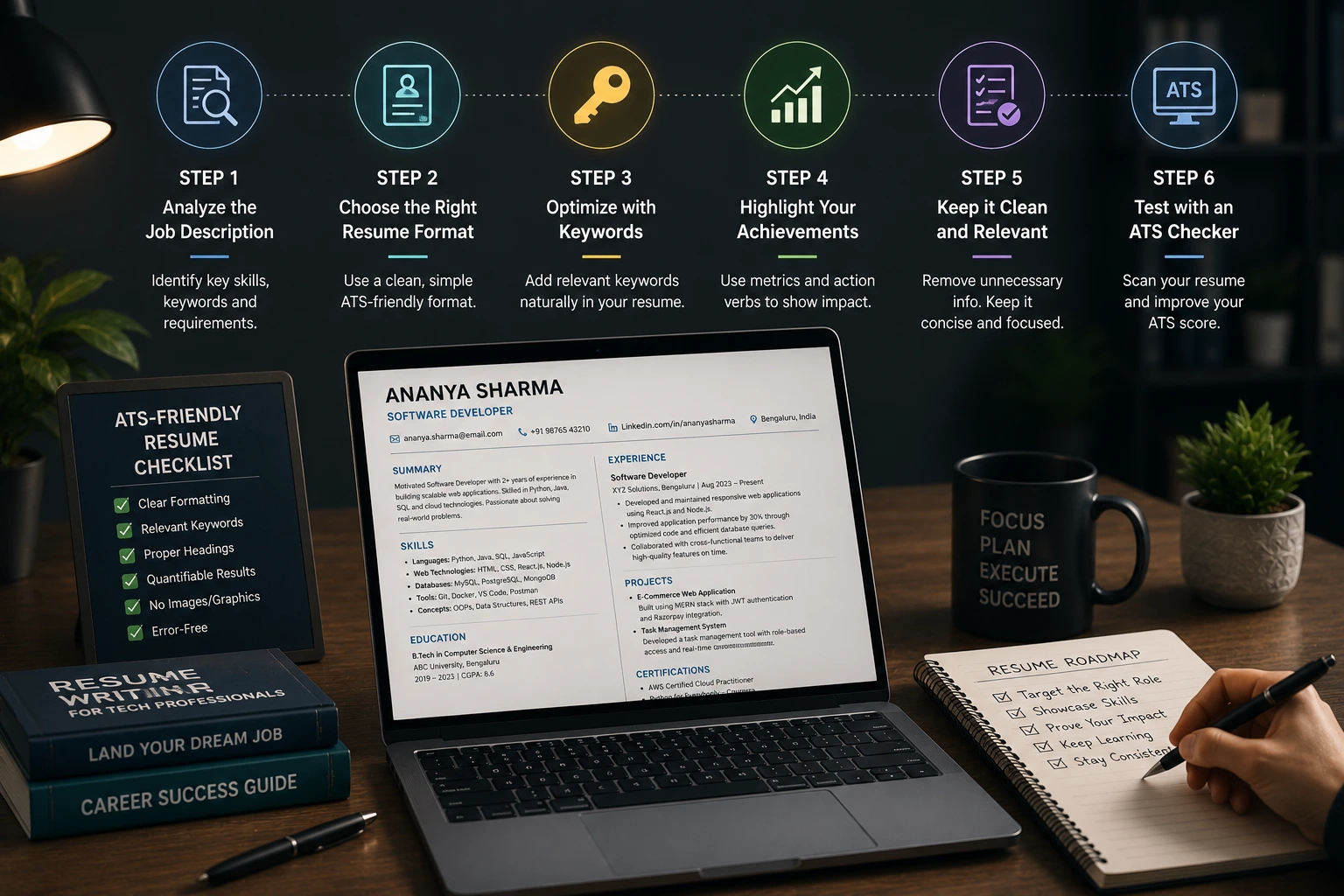
Building a tech-forward resume requires moving away from generic templates to focus on structural optimization. Let’s look at the step-by-step process to build a tech resume that passes the software filters.
1. Choose a Clean, Machine-Readable Layout
The biggest mistake job seekers make is using complex, multi-column templates filled with graphic design elements, progress bars for skills, and profile pictures. While these might look visually appealing to you, they confuse the software parsing engines.
Keep it Single-Column: Stick to a clean, traditional top-to-bottom layout. The software reads text linearly; multi-column formats often cause the system to scramble your text, mixing your experience with your contact details.
Use Standard Fonts: Stick to universally recognized web fonts like Arial, Calibri, or Times New Roman.
Avoid Graphic Elements: Never use images, text boxes, tables, icons, or visual charts to represent your skills. The software cannot read images, meaning any text hidden inside a graphic block will be completely ignored.
2. Match Your Keywords to the Job Description
The tracking system acts like a search engine. When a recruiter looks for a candidate, they type specific search terms into the system, such as "Python", "SQL", or "SEO Optimization". If your resume does not contain those exact phrases, your profile will not rank.
Analyze the Job Listing: Carefully read the requirements section of the job you want. If they list Data Analytics and specify tools like Power BI, do not just write "Business Intelligence" on your resume. Use the exact phrase Power BI.
Create a Dedicated Technical Skills Section: Group your competencies clearly so the parsing software can index them immediately. For example:
Programming Languages: Python, JavaScript
Database Management: SQL, PostgreSQL
Design Tools: Figma, Adobe XD
3. Format Your Experience Using Action Verbs and Metrics
The software does not just look for keywords; it measures contextual impact. Avoid writing passive duty descriptions like "Responsible for managing social media accounts." Instead, use action-oriented language backed by tangible data or percentages.
The Formula: Action Verb + Core Project Task + Measurable Result.
Weak Example: "Helped design web pages and fixed software bugs."
ATS-Optimized Example: "Developed responsive web application features using React.js, reducing page load times by 15% and improving overall user retention."
4. Save and Upload in the Correct File Format
Unless a job application explicitly asks for a plain text file, always save your document as a PDF or a standard Word document (Direct .docx).
Before uploading, perform a quick manual test: press Ctrl + A (Select All) on your document, copy the text, and paste it into a blank Notepad file. If all your words paste cleanly without merging or turning into unreadable characters, the software will parse your document successfully.
Get Job-Ready and Certified with Zen Institute
Writing an optimized resume is easy when you have real, industry-aligned portfolio projects to showcase. If your resume currently looks blank or feels limited to academic textbook definitions, it's time to build the practical experience that modern employers value.
At Zen Institute Mangalore, we don't just teach software tools—we train you to become job-ready. Through our hands-on technical programs, you will work on live corporate case studies, build real-world student portfolios, and learn directly from elite mentors currently working at top global MNCs.
As part of our dedicated student path, every learner receives comprehensive portfolio and resume-building guidance, rigorous interview preparation, and direct job referral support to connect you with leading firms across coastal Karnataka.
Stop sending out unoptimized resumes that disappear into the corporate void. Build your practical skills, optimize your professional profile, and secure your place in a growing technology market.
Frequently Asked Questions (FAQs)
1. What is an ATS, and why is it important for job seekers?
An Applicant Tracking System (ATS) is software used by employers to scan and filter resumes before they reach recruiters. An ATS-friendly resume increases your chances of being shortlisted for interviews.
2. How can I make my resume ATS-friendly?
Use a clean single-column layout, standard fonts, relevant keywords from the job description, clear section headings, and avoid images, tables, icons, and graphics that ATS software may not read correctly.
3. Why are keywords important in an ATS resume?
ATS software searches for specific skills and job-related terms. Including relevant keywords such as programming languages, tools, and certifications from the job description can improve your resume's ranking.
4. Which file format is best for an ATS resume?
Unless otherwise specified by the employer, save your resume in PDF or DOCX format. These formats are widely accepted and help ensure your resume is parsed correctly by ATS software.
5. How can Zen Institute help you build an ATS-friendly resume?
Zen Institute provides hands-on technical training, portfolio development, ATS-compliant resume guidance, mock interviews, and placement support to help students become job-ready and succeed in the recruitment process.